- 现代化UI设计:模仿微信的深色/浅色主题、聊天窗口布局。
- 消息发送与接收:可以输入并发送消息,并实时显示在聊天区域。
- 模拟多用户聊天:可以切换不同的聊天对象(朋友、群聊)。
- 消息类型:支持纯文本、图片和文件消息的发送与展示。
- 交互功能:发送消息后清空输入框、滚动到底部、时间戳显示、发送状态等。
- 响应式设计:适配不同屏幕尺寸。
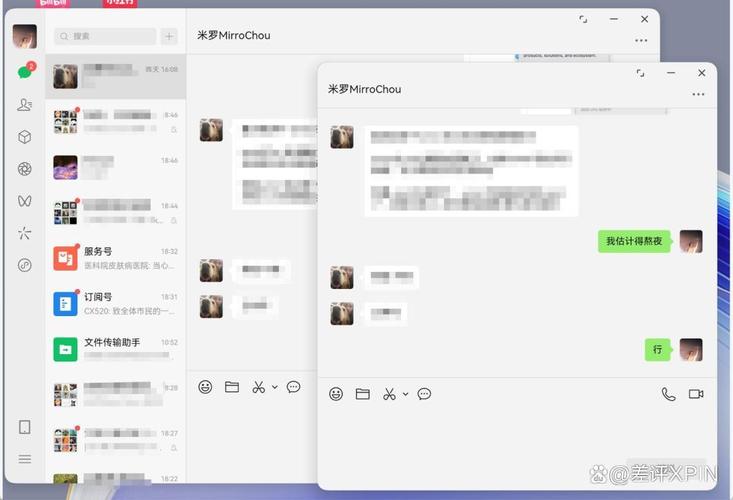
最终效果预览
项目结构
为了方便管理,我们将创建一个简单的项目结构:
(图片来源网络,侵删)
wechat-web/
├── index.html       # 主页面
├── style.css        # 样式文件
└── script.js        # 交互逻辑
HTML 代码 (index.html)
这是页面的骨架,定义了聊天界面的所有元素,包括侧边栏、聊天区域和消息输入框。
<!DOCTYPE html>
<html lang="zh-CN">
<head>
    <meta charset="UTF-8">
    <meta name="viewport" content="width=device-width, initial-scale=1.0">网页版微信</title>
    <link rel="stylesheet" href="style.css">
    <!-- 引入一个简单的图标库,用于头像和功能图标 -->
    <link rel="stylesheet" href="https://cdnjs.cloudflare.com/ajax/libs/font-awesome/6.4.0/css/all.min.css">
</head>
<body>
    <div class="container">
        <!-- 左侧联系人列表 -->
        <div class="sidebar">
            <div class="user-profile">
                <img src="https://i.pravatar.cc/150?img=1" alt="我的头像" class="avatar">
                <p class="user-name">我的微信</p>
            </div>
            <div class="search-box">
                <input type="text" placeholder="搜索">
                <i class="fas fa-search"></i>
            </div>
            <div class="contacts" id="contacts-list">
                <!-- 联系人列表将通过 JavaScript 动态生成 -->
            </div>
        </div>
        <!-- 右侧聊天区域 -->
        <div class="main-content">
            <!-- 聊天头部 -->
            <div class="chat-header" id="chat-header">
                <img src="https://i.pravatar.cc/150?img=2" alt="联系人头像" class="avatar">
                <div class="chat-info">
                    <p class="chat-name" id="current-chat-name">张三</p>
                    <p class="chat-status">在线</p>
                </div>
                <div class="chat-actions">
                    <i class="fas fa-ellipsis-v"></i>
                </div>
            </div>
            <!-- 聊天消息区域 -->
            <div class="chat-messages" id="chat-messages">
                <!-- 消息将通过 JavaScript 动态生成 -->
            </div>
            <!-- 消息输入区域 -->
            <div class="message-input">
                <label for="file-input" class="file-label">
                    <i class="fas fa-paperclip"></i>
                </label>
                <input type="file" id="file-input" style="display: none;" accept="image/*,.pdf,.doc,.docx,.txt">
                <input type="text" id="message-input" placeholder="请输入消息...">
                <button id="send-button"><i class="fas fa-paper-plane"></i></button>
            </div>
        </div>
    </div>
    <script src="script.js"></script>
</body>
</html>
CSS 代码 (style.css)
这是样式文件,负责界面的美化,包括布局、颜色、字体和动画效果。
/* 全局样式 */
* {
    margin: 0;
    padding: 0;
    box-sizing: border-box;
    font-family: -apple-system, BlinkMacSystemFont, 'Segoe UI', 'PingFang SC', 'Hiragino Sans GB', 'Microsoft YaHei', 'Helvetica Neue', Helvetica, Arial, sans-serif;
}
body {
    background-color: #f5f5f5;
    height: 100vh;
    overflow: hidden;
}
.container {
    display: flex;
    height: 100vh;
}
/* 侧边栏样式 */
.sidebar {
    width: 280px;
    background-color: #2e3238;
    color: #f1f1f1;
    display: flex;
    flex-direction: column;
}
.user-profile {
    padding: 20px;
    display: flex;
    align-items: center;
    border-bottom: 1px solid #3e4248;
}
.user-profile .avatar {
    width: 50px;
    height: 50px;
    border-radius: 50%;
    margin-right: 15px;
}
.user-name {
    font-size: 18px;
    font-weight: 500;
}
.search-box {
    padding: 15px;
    position: relative;
}
.search-box input {
    width: 100%;
    padding: 10px 35px 10px 15px;
    border-radius: 20px;
    border: none;
    background-color: #3e4248;
    color: #f1f1f1;
    outline: none;
}
.search-box i {
    position: absolute;
    right: 15px;
    top: 50%;
    transform: translateY(-50%);
    color: #8a8d91;
}
.contacts {
    flex: 1;
    overflow-y: auto;
}
.contact-item {
    padding: 15px;
    display: flex;
    align-items: center;
    cursor: pointer;
    transition: background-color 0.2s;
    border-bottom: 1px solid #3e4248;
}
.contact-item:hover {
    background-color: #3e4248;
}
.contact-item.active {
    background-color: #3e4248;
}
.contact-item .avatar {
    width: 45px;
    height: 45px;
    border-radius: 50%;
    margin-right: 15px;
}
.contact-info {
    flex: 1;
    white-space: nowrap;
    overflow: hidden;
    text-overflow: ellipsis;
}
.contact-name {
    font-size: 16px;
    margin-bottom: 3px;
}
.contact-message {
    font-size: 13px;
    color: #8a8d91;
}
/* 主聊天区域样式 */
.main-content {
    flex: 1;
    display: flex;
    flex-direction: column;
    background-color: #f5f5f5;
}
.chat-header {
    height: 60px;
    background-color: #fff;
    display: flex;
    align-items: center;
    padding: 0 20px;
    box-shadow: 0 1px 2px rgba(0, 0, 0, 0.1);
}
.chat-header .avatar {
    width: 40px;
    height: 40px;
    border-radius: 50%;
    margin-right: 15px;
}
.chat-info {
    flex: 1;
}
.chat-name {
    font-size: 16px;
    font-weight: 500;
}
.chat-status {
    font-size: 13px;
    color: #8a8d91;
}
.chat-actions i {
    font-size: 18px;
    color: #8a8d91;
    cursor: pointer;
}
/* 消息区域 */
.chat-messages {
    flex: 1;
    padding: 20px;
    overflow-y: auto;
    background-color: #e9ecef;
    background-image: url('data:image/svg+xml;base64,PHN2ZyB4bWxucz0iaHR0cDovL3d3dy53My5vcmcvMjAwMC9zdmciIHdpZHRoPSIyMCIgaGVpZ2h0PSIyMCI+CiAgPHJlY3Qgd2lkdGg9IjIwIiBoZWlnaHQ9IjIwIiBmaWxsPSIjZGRkIiBmaWxsLW9wYWNpdHk9IjAuMiIvPgogIDxwYXRoIGQ9Ik0yMCAyMEg2MHYyMEgyMCIgc3Ryb2tlPSIjZmZmIiBzdHJva2Utd2lkdGg9IjEiLz4KPC9zdmc+');
    background-size: 20px 20px;
}
.message {
    margin-bottom: 15px;
    display: flex;
    align-items: flex-start;
}
.message.sent {
    justify-content: flex-end;
}
.message.received {
    justify-content: flex-start;
}
.message .avatar {
    width: 35px;
    height: 35px;
    border-radius: 50%;
    margin: 0 10px;
}
.message-content {
    max-width: 60%;
    position: relative;
}
.sent .message-content {
    text-align: right;
}
.message-bubble {
    padding: 10px 15px;
    border-radius: 18px;
    word-wrap: break-word;
}
.sent .message-bubble {
    background-color: #95ec69;
    color: #333;
}
.received .message-bubble {
    background-color: #fff;
    color: #333;
    box-shadow: 0 1px 2px rgba(0, 0, 0, 0.1);
}
.message-time {
    font-size: 11px;
    color: #8a8d91;
    margin-top: 5px;
    padding: 0 10px;
}
/* 输入区域样式 */
.message-input {
    padding: 15px;
    background-color: #fff;
    display: flex;
    align-items: center;
    box-shadow: 0 -1px 2px rgba(0, 0, 0, 0.1);
}
.file-label {
    font-size: 20px;
    color: #8a8d91;
    margin-right: 15px;
    cursor: pointer;
}
.file-label:hover {
    color: #000;
}
#message-input {
    flex: 1;
    padding: 10px 15px;
    border: 1px solid #e0e0e0;
    border-radius: 20px;
    outline: none;
    font-size: 14px;
}
#message-input:focus {
    border-color: #007bff;
}
#send-button {
    margin-left: 15px;
    background-color: #07c160;
    color: white;
    border: none;
    width: 40px;
    height: 40px;
    border-radius: 50%;
    cursor: pointer;
    display: flex;
    align-items: center;
    justify-content: center;
    transition: background-color 0.2s;
}
#send-button:hover {
    background-color: #06ae56;
}
/* 文件消息样式 */
.file-message {
    display: flex;
    align-items: center;
    padding: 10px 15px;
    background-color: #f0f0f0;
    border-radius: 18px;
    max-width: 60%;
}
.file-message i {
    font-size: 20px;
    margin-right: 10px;
    color: #007bff;
}
.file-info {
    font-size: 14px;
    color: #333;
}
.file-name {
    font-weight: 500;
}
.file-size {
    font-size: 12px;
    color: #8a8d91;
}
JavaScript 代码 (script.js)
这是核心逻辑部分,负责处理用户交互、动态生成内容、管理消息数据等。
document.addEventListener('DOMContentLoaded', () => {
    // --- DOM 元素 ---
    const contactsList = document.getElementById('contacts-list');
    const chatMessages = document.getElementById('chat-messages');
    const messageInput = document.getElementById('message-input');
    const sendButton = document.getElementById('send-button');
    const currentChatNameEl = document.getElementById('current-chat-name');
    const fileInput = document.getElementById('file-input');
    // --- 数据模型 ---
    // 模拟联系人数据
    const contacts = [
        { id: 1, name: '张三', avatar: 'https://i.pravatar.cc/150?img=2', lastMessage: '好的,明天见!', status: '在线' },
        { id: 2, name: '李四', avatar: 'https://i.pravatar.cc/150?img=3', lastMessage: '收到文件了,谢谢', status: '离线' },
        { id: 3, name: '产品经理群', avatar: 'https://i.pravatar.cc/150?img=4', lastMessage: '王五: 这个需求再讨论一下', status: '3人在线' },
        { id: 4, name: '王五', avatar: 'https://i.pravatar.cc/150?img=5', lastMessage: '哈哈哈,太搞笑了', status: '在线' },
    ];
    // 模拟聊天记录数据
    const chatHistory = {
        1: [
            { sender: 'other', text: '嗨,最近怎么样?', time: '10:30' },
            { sender: 'me', text: '挺好的,你呢?', time: '10:31' },
            { sender: 'other', text: '我也不错,明天有空一起吃饭吗?', time: '10:32' },
            { sender: 'me', text: '好的,明天见!', time: '10:33' },
        ],
        2: [
            { sender: 'me', text: '这是你要的资料', time: '昨天', file: { name: '项目计划书.pdf', size: '2.5MB' } },
            { sender: 'other', text: '收到文件了,谢谢', time: '昨天' },
        ],
        3: [
            { sender: 'other', text: '大家好,下午开会', time: '09:00' },
            { sender: 'other', text: '王五: 这个需求再讨论一下', time: '09:05' },
        ],
        4: [
            { sender: 'other', text: '看看这个链接', time: '刚刚', file: { name: '有趣的文章.html', size: '0.1MB' } },
            { sender: 'me', text: '哈哈哈,太搞笑了', time: '刚刚' },
        ],
    };
    let currentChatId = 1; // 当前正在聊天的联系人ID
    // --- 函数 ---
    /**
     * 渲染联系人列表
     */
    function renderContacts() {
        contactsList.innerHTML = '';
        contacts.forEach(contact => {
            const contactEl = document.createElement('div');
            contactEl.className = `contact-item ${contact.id === currentChatId ? 'active' : ''}`;
            contactEl.dataset.contactId = contact.id;
            contactEl.innerHTML = `
                <img src="${contact.avatar}" alt="${contact.name}" class="avatar">
                <div class="contact-info">
                    <p class="contact-name">${contact.name}</p>
                    <p class="contact-message">${contact.lastMessage}</p>
                </div>
            `;
            contactEl.addEventListener('click', () => switchChat(contact.id));
            contactsList.appendChild(contactEl);
        });
    }
    /**
     * 切换聊天
     * @param {number} contactId - 要切换到的联系人ID
     */
    function switchChat(contactId) {
        currentChatId = contactId;
        const contact = contacts.find(c => c.id === contactId);
        // 更新聊天头部信息
        currentChatNameEl.textContent = contact.name;
        document.querySelector('.chat-header .avatar').src = contact.avatar;
        // 更新联系人列表的激活状态
        document.querySelectorAll('.contact-item').forEach(item => {
            item.classList.toggle('active', parseInt(item.dataset.contactId) === contactId);
        });
        // 重新渲染聊天记录
        renderMessages();
    }
    /**
     * 渲染聊天消息
     */
    function renderMessages() {
        chatMessages.innerHTML = '';
        const messages = chatHistory[currentChatId] || [];
        messages.forEach(msg => {
            const messageEl = document.createElement('div');
            messageEl.className = `message ${msg.sender === 'me' ? 'sent' : 'received'}`;
            let messageContent = '';
            if (msg.file) {
                messageContent = `
                    <div class="message-bubble file-message">
                        <i class="fas ${getFileIcon(msg.file.name)}"></i>
                        <div class="file-info">
                            <div class="file-name">${msg.file.name}</div>
                            <div class="file-size">${msg.file.size}</div>
                        </div>
                    </div>
                `;
            } else {
                messageContent = `<div class="message-bubble">${msg.text}</div>`;
            }
            messageEl.innerHTML = `
                <img src="${contacts.find(c => c.id === (msg.sender === 'me' ? 1 : currentChatId)).avatar}" alt="头像" class="avatar">
                <div class="message-content">
                    ${messageContent}
                    <div class="message-time">${msg.time}</div>
                </div>
            `;
            chatMessages.appendChild(messageEl);
        });
        // 滚动到底部
        chatMessages.scrollTop = chatMessages.scrollHeight;
    }
    /**
     * 根据文件名获取图标
     * @param {string} filename - 文件名
     * @returns {string} - Font Awesome 图标类名
     */
    function getFileIcon(filename) {
        const ext = filename.split('.').pop().toLowerCase();
        const iconMap = {
            'pdf': 'fa-file-pdf',
            'doc': 'fa-file-word',
            'docx': 'fa-file-word',
            'txt': 'fa-file-alt',
            'jpg': 'fa-file-image',
            'jpeg': 'fa-file-image',
            'png': 'fa-file-image',
            'gif': 'fa-file-image',
        };
        return iconMap[ext] || 'fa-file';
    }
    /**
     * 发送消息
     */
    function sendMessage() {
        const text = messageInput.value.trim();
        const file = fileInput.files[0];
        if (!text && !file) return;
        const newMessage = {
            sender: 'me',
            time: new Date().toLocaleTimeString('zh-CN', { hour: '2-digit', minute: '2-digit' }),
        };
        if (file) {
            newMessage.file = {
                name: file.name,
                size: (file.size / 1024 / 1024).toFixed(2) + 'MB'
            };
        } else {
            newMessage.text = text;
        }
        // 添加到当前聊天记录
        if (!chatHistory[currentChatId]) {
            chatHistory[currentChatId] = [];
        }
        chatHistory[currentChatId].push(newMessage);
        // 清空输入框和文件选择
        messageInput.value = '';
        fileInput.value = '';
        // 重新渲染消息
        renderMessages();
        // 模拟对方回复
        setTimeout(() => {
            const replies = [
                '收到!',
                '好的,明白了。',
                '没问题。',
                '👍',
                '稍后回复你。'
            ];
            const replyMessage = {
                sender: 'other',
                text: replies[Math.floor(Math.random() * replies.length)],
                time: new Date().toLocaleTimeString('zh-CN', { hour: '2-digit', minute: '2-digit' }),
            };
            chatHistory[currentChatId].push(replyMessage);
            renderMessages();
        }, 1000 + Math.random() * 2000);
    }
    // --- 事件监听器 ---
    sendButton.addEventListener('click', sendMessage);
    messageInput.addEventListener('keypress', (e) => {
        if (e.key === 'Enter') {
            sendMessage();
        }
    });
    fileInput.addEventListener('change', (e) => {
        if (e.target.files.length > 0) {
            sendMessage();
        }
    });
    // --- 初始化 ---
    renderContacts();
    renderMessages();
});
如何使用
- 创建文件:在你的电脑上创建一个名为
wechat-web的文件夹,然后在里面创建index.html、style.css和script.js三个文件。 - 复制代码:将上面提供的代码分别复制到对应的文件中。
- 打开网页:用浏览器(如 Chrome, Firefox, Edge)打开
index.html文件。
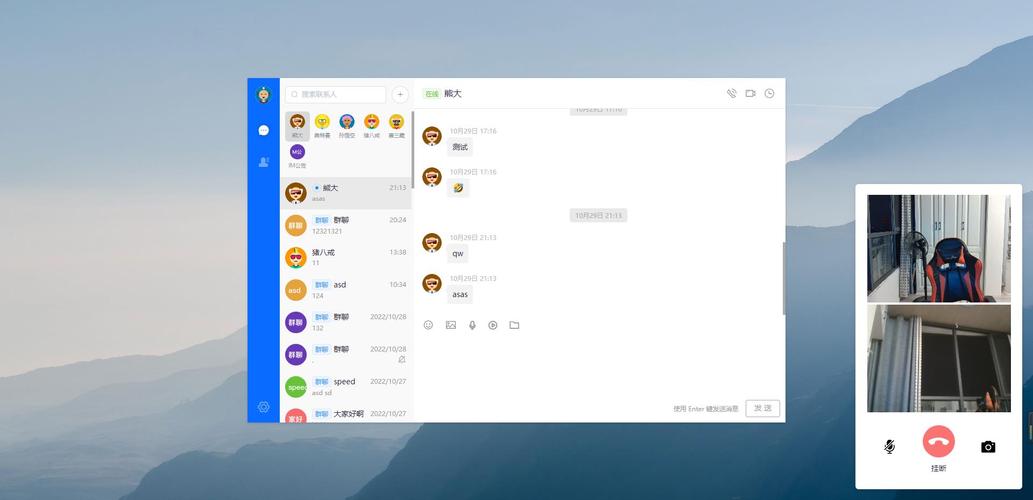
你就可以看到一个功能完整的网页版微信聊天界面了,你可以点击左侧的联系人切换聊天,输入文字或选择文件发送消息,并能看到模拟的自动回复。
(图片来源网络,侵删)
(图片来源网络,侵删)


