您可以直接复制下面的全部代码,保存为一个 .html 文件(loan-calculator.html),然后用浏览器打开即可使用。
(图片来源网络,侵删)
功能特点
- 清晰的输入界面:包含贷款金额、年利率、贷款期限(年)和还款方式(等额本息/等额本金)。
- 实时计算:输入任何数值后,月供和总利息会自动更新。
- 详细的还款计划表:可以查看每个月的还款明细,包括月供、本金、利息和剩余本金。
- 现代化UI设计:使用了 Tailwind CSS 框架,界面美观、整洁。
- 响应式布局:自适应不同屏幕尺寸。
完整 HTML 代码
<!DOCTYPE html>
<html lang="zh-CN">
<head>
    <meta charset="UTF-8">
    <meta name="viewport" content="width=device-width, initial-scale=1.0">智能贷款计算器</title>
    <!-- Tailwind CSS -->
    <script src="https://cdn.tailwindcss.com"></script>
    <!-- Font Awesome for icons -->
    <link rel="stylesheet" href="https://cdnjs.cloudflare.com/ajax/libs/font-awesome/6.4.0/css/all.min.css">
</head>
<body class="bg-gray-50">
    <div class="container mx-auto px-4 py-8 max-w-6xl">
        <header class="text-center mb-10">
            <h1 class="text-4xl font-bold text-gray-800 mb-2">
                <i class="fas fa-calculator text-blue-600 mr-2"></i>
                智能贷款计算器
            </h1>
            <p class="text-gray-600">轻松计算您的月供与还款计划,让贷款规划更清晰</p>
        </header>
        <main class="grid lg:grid-cols-2 gap-8">
            <!-- 输入面板 -->
            <section class="bg-white rounded-xl shadow-md p-6">
                <h2 class="text-2xl font-semibold text-gray-800 mb-6">贷款信息</h2>
                <div class="space-y-5">
                    <!-- 贷款金额 -->
                    <div>
                        <label for="loanAmount" class="block text-sm font-medium text-gray-700 mb-1">
                            贷款金额 (元)
                        </label>
                        <div class="relative">
                            <span class="absolute inset-y-0 left-0 pl-3 flex items-center text-gray-500">¥</span>
                            <input type="number" id="loanAmount" value="1000000" min="1000" step="1000"
                                class="w-full pl-8 pr-3 py-2 border border-gray-300 rounded-lg focus:ring-2 focus:ring-blue-500 focus:border-blue-500 outline-none transition">
                        </div>
                    </div>
                    <!-- 年利率 -->
                    <div>
                        <label for="interestRate" class="block text-sm font-medium text-gray-700 mb-1">
                            年利率 (%)
                        </label>
                        <div class="relative">
                            <input type="number" id="interestRate" value="4.9" min="0.01" step="0.01"
                                class="w-full pr-8 pl-3 py-2 border border-gray-300 rounded-lg focus:ring-2 focus:ring-blue-500 focus:border-blue-500 outline-none transition">
                            <span class="absolute inset-y-0 right-0 pr-3 flex items-center text-gray-500">%</span>
                        </div>
                    </div>
                    <!-- 贷款期限 -->
                    <div>
                        <label for="loanTerm" class="block text-sm font-medium text-gray-700 mb-1">
                            贷款期限 (年)
                        </label>
                        <input type="number" id="loanTerm" value="20" min="1" max="30"
                            class="w-full px-3 py-2 border border-gray-300 rounded-lg focus:ring-2 focus:ring-blue-500 focus:border-blue-500 outline-none transition">
                    </div>
                    <!-- 还款方式 -->
                    <div>
                        <label class="block text-sm font-medium text-gray-700 mb-2">还款方式</label>
                        <div class="grid grid-cols-2 gap-3">
                            <label class="relative">
                                <input type="radio" name="paymentType" value="equal_payment" checked
                                    class="peer sr-only">
                                <div class="p-3 text-center border-2 border-gray-300 rounded-lg cursor-pointer transition peer-checked:border-blue-600 peer-checked:bg-blue-50">
                                    <i class="fas fa-balance-scale text-lg mb-1"></i>
                                    <p class="text-sm font-medium">等额本息</p>
                                    <p class="text-xs text-gray-500">月供固定</p>
                                </div>
                            </label>
                            <label class="relative">
                                <input type="radio" name="paymentType" value="equal_principal"
                                    class="peer sr-only">
                                <div class="p-3 text-center border-2 border-gray-300 rounded-lg cursor-pointer transition peer-checked:border-blue-600 peer-checked:bg-blue-50">
                                    <i class="fas fa-chart-line text-lg mb-1"></i>
                                    <p class="text-sm font-medium">等额本金</p>
                                    <p class="text-xs text-gray-500">本金固定</p>
                                </div>
                            </label>
                        </div>
                    </div>
                </div>
            </section>
            <!-- 结果面板 -->
            <section class="bg-white rounded-xl shadow-md p-6">
                <h2 class="text-2xl font-semibold text-gray-800 mb-6">计算结果</h2>
                <div class="grid grid-cols-2 gap-4 mb-6">
                    <div class="bg-blue-50 p-4 rounded-lg text-center">
                        <p class="text-sm text-gray-600 mb-1">月供</p>
                        <p id="monthlyPayment" class="text-2xl font-bold text-blue-600">¥ 0</p>
                    </div>
                    <div class="bg-green-50 p-4 rounded-lg text-center">
                        <p class="text-sm text-gray-600 mb-1">支付总额</p>
                        <p id="totalPayment" class="text-2xl font-bold text-green-600">¥ 0</p>
                    </div>
                    <div class="bg-orange-50 p-4 rounded-lg text-center">
                        <p class="text-sm text-gray-600 mb-1">总利息</p>
                        <p id="totalInterest" class="text-2xl font-bold text-orange-600">¥ 0</p>
                    </div>
                    <div class="bg-purple-50 p-4 rounded-lg text-center">
                        <p class="text-sm text-gray-600 mb-1">首期月供</p>
                        <p id="firstPayment" class="text-2xl font-bold text-purple-600">¥ 0</p>
                    </div>
                </div>
                <button id="showScheduleBtn"
                    class="w-full py-3 bg-blue-600 text-white font-medium rounded-lg hover:bg-blue-700 transition duration-200">
                    <i class="fas fa-table mr-2"></i>查看还款计划表
                </button>
            </section>
        </main>
        <!-- 还款计划表 (默认隐藏) -->
        <section id="scheduleSection" class="hidden mt-8 bg-white rounded-xl shadow-md p-6">
            <div class="flex justify-between items-center mb-6">
                <h2 class="text-2xl font-semibold text-gray-800">还款计划表</h2>
                <button id="hideScheduleBtn" class="text-gray-500 hover:text-gray-700">
                    <i class="fas fa-times text-xl"></i>
                </button>
            </div>
            <div class="overflow-x-auto">
                <table class="min-w-full divide-y divide-gray-200">
                    <thead class="bg-gray-50">
                        <tr>
                            <th class="px-6 py-3 text-left text-xs font-medium text-gray-500 uppercase tracking-wider">期数</th>
                            <th class="px-6 py-3 text-left text-xs font-medium text-gray-500 uppercase tracking-wider">月供 (元)</th>
                            <th class="px-6 py-3 text-left text-xs font-medium text-gray-500 uppercase tracking-wider">本金 (元)</th>
                            <th class="px-6 py-3 text-left text-xs font-medium text-gray-500 uppercase tracking-wider">利息 (元)</th>
                            <th class="px-6 py-3 text-left text-xs font-medium text-gray-500 uppercase tracking-wider">剩余本金 (元)</th>
                        </tr>
                    </thead>
                    <tbody id="scheduleTableBody" class="bg-white divide-y divide-gray-200">
                        <!-- 动态生成的行 -->
                    </tbody>
                </table>
            </div>
        </section>
    </div>
    <script>
        // 获取DOM元素
        const loanAmountInput = document.getElementById('loanAmount');
        const interestRateInput = document.getElementById('interestRate');
        const loanTermInput = document.getElementById('loanTerm');
        const paymentTypeInputs = document.getElementsByName('paymentType');
        const monthlyPaymentEl = document.getElementById('monthlyPayment');
        const totalPaymentEl = document.getElementById('totalPayment');
        const totalInterestEl = document.getElementById('totalInterest');
        const firstPaymentEl = document.getElementById('firstPayment');
        const showScheduleBtn = document.getElementById('showScheduleBtn');
        const hideScheduleBtn = document.getElementById('hideScheduleBtn');
        const scheduleSection = document.getElementById('scheduleSection');
        const scheduleTableBody = document.getElementById('scheduleTableBody');
        // 格式化货币
        function formatCurrency(value) {
            return new Intl.NumberFormat('zh-CN', { style: 'currency', currency: 'CNY', minimumFractionDigits: 2 }).format(value);
        }
        // 计算贷款
        function calculateLoan() {
            const principal = parseFloat(loanAmountInput.value) || 0;
            const annualRate = parseFloat(interestRateInput.value) || 0;
            const years = parseInt(loanTermInput.value) || 0;
            const paymentType = document.querySelector('input[name="paymentType"]:checked').value;
            const monthlyRate = annualRate / 100 / 12;
            const totalMonths = years * 12;
            let monthlyPayment = 0;
            let totalInterest = 0;
            let firstPayment = 0;
            let schedule = [];
            if (paymentType === 'equal_payment') {
                // 等额本息计算
                if (monthlyRate > 0) {
                    monthlyPayment = principal * (monthlyRate * Math.pow(1 + monthlyRate, totalMonths)) / (Math.pow(1 + monthlyRate, totalMonths) - 1);
                }
                totalInterest = monthlyPayment * totalMonths - principal;
                firstPayment = monthlyPayment;
                // 生成还款计划
                let remainingPrincipal = principal;
                for (let i = 1; i <= totalMonths; i++) {
                    const interestPayment = remainingPrincipal * monthlyRate;
                    const principalPayment = monthlyPayment - interestPayment;
                    remainingPrincipal -= principalPayment;
                    schedule.push({
                        period: i,
                        payment: monthlyPayment,
                        principal: principalPayment,
                        interest: interestPayment,
                        remaining: Math.max(0, remainingPrincipal)
                    });
                }
            } else {
                // 等额本金计算
                const monthlyPrincipal = principal / totalMonths;
                totalInterest = (principal * monthlyRate * (totalMonths + 1)) / 2;
                firstPayment = monthlyPrincipal + principal * monthlyRate;
                // 生成还款计划
                let remainingPrincipal = principal;
                for (let i = 1; i <= totalMonths; i++) {
                    const interestPayment = remainingPrincipal * monthlyRate;
                    const payment = monthlyPrincipal + interestPayment;
                    remainingPrincipal -= monthlyPrincipal;
                    schedule.push({
                        period: i,
                        payment: payment,
                        principal: monthlyPrincipal,
                        interest: interestPayment,
                        remaining: Math.max(0, remainingPrincipal)
                    });
                }
            }
            // 更新结果
            monthlyPaymentEl.textContent = formatCurrency(monthlyPayment);
            totalPaymentEl.textContent = formatCurrency(principal + totalInterest);
            totalInterestEl.textContent = formatCurrency(totalInterest);
            firstPaymentEl.textContent = formatCurrency(firstPayment);
            // 保存计划用于显示
            window.currentSchedule = schedule;
        }
        // 显示还款计划表
        function showSchedule() {
            scheduleSection.classList.remove('hidden');
            scheduleTableBody.innerHTML = ''; // 清空旧表格
            if (window.currentSchedule) {
                window.currentSchedule.forEach(item => {
                    const row = document.createElement('tr');
                    row.innerHTML = `
                        <td class="px-6 py-4 whitespace-nowrap text-sm text-gray-500">${item.period}</td>
                        <td class="px-6 py-4 whitespace-nowrap text-sm font-medium text-gray-900">${formatCurrency(item.payment)}</td>
                        <td class="px-6 py-4 whitespace-nowrap text-sm text-gray-900">${formatCurrency(item.principal)}</td>
                        <td class="px-6 py-4 whitespace-nowrap text-sm text-gray-900">${formatCurrency(item.interest)}</td>
                        <td class="px-6 py-4 whitespace-nowrap text-sm text-gray-900">${formatCurrency(item.remaining)}</td>
                    `;
                    scheduleTableBody.appendChild(row);
                });
            }
        }
        // 隐藏还款计划表
        function hideSchedule() {
            scheduleSection.classList.add('hidden');
        }
        // 事件监听器
        [loanAmountInput, interestRateInput, loanTermInput].forEach(input => {
            input.addEventListener('input', calculateLoan);
        });
        paymentTypeInputs.forEach(input => {
            input.addEventListener('change', calculateLoan);
        });
        showScheduleBtn.addEventListener('click', showSchedule);
        hideScheduleBtn.addEventListener('click', hideSchedule);
        // 初始计算
        calculateLoan();
    </script>
</body>
</html>
如何使用
- 复制代码:将上面所有的代码复制下来。
- 创建文件:在你的电脑上创建一个新的文本文件。
- 粘贴并保存:将复制的代码粘贴到这个新文件中,然后将文件名修改为
loan-calculator.html(确保后缀是.html)。 - 打开文件:找到这个文件,用 Chrome、Firefox、Edge 等任何现代浏览器双击打开它。
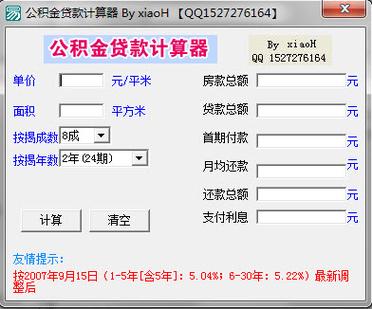
你就可以看到一个功能齐全的贷款计算器了!你可以尝试修改贷款金额、利率、期限和还款方式,所有结果都会实时更新,点击“查看还款计划表”按钮,还能看到详细的每月还款明细。
(图片来源网络,侵删)


