极简静态版 (适合快速展示)
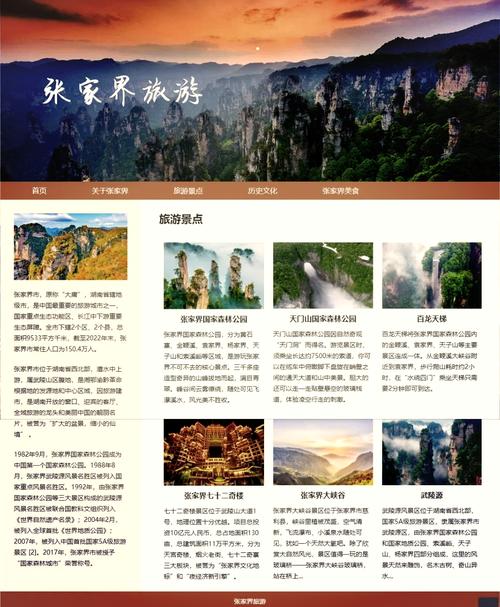
这个版本最简单,只有一个标题、一个二维码图片和下载按钮,您只需要一个HTML文件。
(图片来源网络,侵删)
特点:
- 极简设计,加载速度快。
- 纯静态,无需任何技术框架。
- 适合作为项目简介页或临时下载页。
源代码 (HTML)
<!DOCTYPE html>
<html lang="zh-CN">
<head>
    <meta charset="UTF-8">
    <meta name="viewport" content="width=device-width, initial-scale=1.0">下载我们的App</title>
    <style>
        /* 基础样式 */
        body {
            font-family: -apple-system, BlinkMacSystemFont, "Segoe UI", Roboto, "Helvetica Neue", Arial, sans-serif;
            background-color: #f5f7fa;
            color: #333;
            display: flex;
            justify-content: center;
            align-items: center;
            min-height: 100vh;
            margin: 0;
            text-align: center;
        }
        .container {
            background-color: #ffffff;
            padding: 40px 30px;
            border-radius: 15px;
            box-shadow: 0 10px 30px rgba(0, 0, 0, 0.1);
            max-width: 400px;
            width: 90%;
        }
        .app-icon {
            width: 100px;
            height: 100px;
            margin: 0 auto 20px;
            background-color: #e9ecef;
            border-radius: 20px;
            display: flex;
            align-items: center;
            justify-content: center;
            font-size: 48px;
        }
        h1 {
            font-size: 24px;
            margin-bottom: 10px;
            color: #2c3e50;
        }
        p {
            font-size: 16px;
            color: #7f8c8d;
            margin-bottom: 30px;
        }
        .qrcode-container {
            margin: 30px 0;
        }
        .qrcode {
            width: 180px;
            height: 180px;
            margin: 0 auto;
            background-color: #fff;
            padding: 10px;
            border: 1px solid #eee;
            border-radius: 10px;
            /* 在这里放置你的二维码图片 */
            background-image: url('https://api.qrserver.com/v1/create-qr-code/?size=180x180&data=https://your-app-download-link.com');
            background-size: contain;
            background-repeat: no-repeat;
            background-position: center;
        }
        .download-buttons {
            display: flex;
            flex-direction: column;
            gap: 15px;
        }
        .download-btn {
            display: inline-flex;
            align-items: center;
            justify-content: center;
            gap: 10px;
            padding: 15px 20px;
            border: none;
            border-radius: 10px;
            font-size: 16px;
            font-weight: bold;
            text-decoration: none;
            cursor: pointer;
            transition: transform 0.2s, box-shadow 0.2s;
        }
        .download-btn:hover {
            transform: translateY(-2px);
            box-shadow: 0 5px 15px rgba(0, 0, 0, 0.2);
        }
        .btn-apple {
            background-color: #000;
            color: #fff;
        }
        .btn-android {
            background-color: #3DDC84;
            color: #fff;
        }
    </style>
</head>
<body>
    <div class="container">
        <div class="app-icon">📱</div>
        <h1>超棒App</h1>
        <p>随时随地,享受极致体验。</p>
        <div class="qrcode-container">
            <div class="qrcode"></div>
            <p style="font-size: 14px; margin-top: 10px;">扫码下载</p>
        </div>
        <div class="download-buttons">
            <a href="https://apps.apple.com/app/idYOUR_APP_ID" class="download-btn btn-apple">
                <svg width="24" height="24" viewBox="0 0 24 24" fill="currentColor">
                    <!-- Apple Logo SVG Path -->
                    <path d="M18.71 19.5c-.83 1.24-1.71 2.45-3.05 2.47-1.34.03-1.77-.79-3.29-.79-1.53 0-2 .77-3.27.82-1.31.05-2.3-1.32-3.14-2.53C4.25 17 2.94 12.45 4.7 9.39c.87-1.52 2.43-2.48 4.12-2.51 1.28-.02 2.5.87 3.29.87.78 0 2.26-1.07 3.81-.91.65.03 2.47.26 3.64 1.98-.09.06-2.17 1.28-2.15 3.81.03 3.02 2.65 4.03 2.68 4.04-.03.07-.42 1.44-1.38 2.83M13 3.5c.73-.83 1.94-1.46 2.94-1.5.13 1.17-.34 2.35-1.04 3.19-.69.85-1.83 1.51-2.95 1.42-.15-1.15.41-2.35 1.05-3.11z"/>
                </svg>
                App Store 下载
            </a>
            <a href="https://play.google.com/store/apps/details?id=com.your.package.name" class="download-btn btn-android">
                <svg width="24" height="24" viewBox="0 0 24 24" fill="currentColor">
                    <!-- Android Logo SVG Path -->
                    <path d="M17.9 17.39c.26-.81.4-1.6.4-2.39 0-.79-.14-1.58-.4-2.39l1.92-1.5c.43-.34.54-.95.24-1.41l-1.83-3.16c-.3-.46-.91-.61-1.4-.34l-2.25 1.26c-1.17-.9-2.49-1.46-3.92-1.66V2.81c0-.55-.45-1-1-1h-3.5c-.55 0-1 .45-1 1v1.97C4.05 5.16 2.5 6.81 2.5 8.79v5.42c0 1.98 1.55 3.63 3.5 3.98v1.97c0 .55.45 1 1 1h3.5c.55 0 1-.45 1-1v-1.97c1.43-.2 2.75-.76 3.92-1.66l2.25 1.26c.49.27 1.1.12 1.4-.34l1.83-3.16c.3-.46.2-1.07-.24-1.41l-1.92-1.5zM12 15.4c-1.68 0-3.04-1.36-3.04-3.04 0-1.68 1.36-3.04 3.04-3.04 1.68 0 3.04 1.36 3.04 3.04 0 1.68-1.36 3.04-3.04 3.04z"/>
                </svg>
                Google Play 下载
            </a>
        </div>
    </div>
</body>
</html>
如何使用:
- 将上述代码保存为
index.html文件。 - 修改二维码图片:找到
<div class="qrcode">标签中的background-image属性的URL,替换成你自己的二维码图片链接,你可以使用在线二维码生成器生成。 - 修改下载链接:将
a标签的href属性链接替换成你的App在App Store和Google Play的真实链接。 - 修改App信息、描述、图标等为你自己的内容。
交互式现代版 (推荐)
这个版本增加了更多的交互效果和现代设计元素,如滚动动画、悬停效果等,用户体验更好。
特点:
- 现代化设计,视觉冲击力强。
- 包含滚动触发的动画效果。
- 响应式布局,在手机和电脑上都有良好体验。
- 使用了
Animate.css库来实现简单动画。
源代码 (HTML)
<!DOCTYPE html>
<html lang="zh-CN">
<head>
    <meta charset="UTF-8">
    <meta name="viewport" content="width=device-width, initial-scale=1.0">App下载 - 体验未来</title>
    <!-- Animate.css for animations -->
    <link rel="stylesheet" href="https://cdnjs.cloudflare.com/ajax/libs/animate.css/4.1.1/animate.min.css"/>
    <style>
        /* 全局样式和变量 */
        :root {
            --primary-color: #6366f1;
            --secondary-color: #8b5cf6;
            --text-dark: #1e293b;
            --text-light: #64748b;
            --bg-light: #f8fafc;
        }
        * {
            margin: 0;
            padding: 0;
            box-sizing: border-box;
        }
        body {
            font-family: -apple-system, BlinkMacSystemFont, "Segoe UI", Roboto, sans-serif;
            line-height: 1.6;
            color: var(--text-dark);
            background-color: var(--bg-light);
            overflow-x: hidden;
        }
        .container {
            max-width: 1200px;
            margin: 0 auto;
            padding: 0 20px;
        }
        /* Hero Section */
        .hero {
            min-height: 100vh;
            display: flex;
            align-items: center;
            justify-content: center;
            text-align: center;
            background: linear-gradient(135deg, #667eea 0%, #764ba2 100%);
            color: white;
            position: relative;
        }
        .hero-content h1 {
            font-size: 3.5rem;
            margin-bottom: 1rem;
            opacity: 0;
            animation: fadeInUp 1s ease forwards;
        }
        .hero-content p {
            font-size: 1.25rem;
            margin-bottom: 2rem;
            opacity: 0;
            animation: fadeInUp 1s ease 0.2s forwards;
        }
        .cta-buttons {
            display: flex;
            gap: 20px;
            justify-content: center;
            flex-wrap: wrap;
            opacity: 0;
            animation: fadeInUp 1s ease 0.4s forwards;
        }
        .btn {
            display: inline-flex;
            align-items: center;
            gap: 10px;
            padding: 15px 30px;
            border-radius: 50px;
            font-size: 1.1rem;
            font-weight: bold;
            text-decoration: none;
            color: white;
            transition: all 0.3s ease;
            box-shadow: 0 4px 15px rgba(0,0,0,0.2);
        }
        .btn-apple {
            background-color: #000;
        }
        .btn-apple:hover {
            background-color: #333;
            transform: translateY(-3px);
            box-shadow: 0 7px 20px rgba(0,0,0,0.3);
        }
        .btn-android {
            background-color: #3DDC84;
        }
        .btn-android:hover {
            background-color: #2fb870;
            transform: translateY(-3px);
            box-shadow: 0 7px 20px rgba(61, 220, 132, 0.4);
        }
        /* Features Section */
        .features {
            padding: 100px 0;
            text-align: center;
        }
        .features h2 {
            font-size: 2.5rem;
            margin-bottom: 3rem;
            color: var(--text-dark);
        }
        .features-grid {
            display: grid;
            grid-template-columns: repeat(auto-fit, minmax(300px, 1fr));
            gap: 40px;
        }
        .feature-card {
            padding: 30px;
            background: white;
            border-radius: 15px;
            box-shadow: 0 5px 15px rgba(0,0,0,0.05);
            transition: transform 0.3s ease, box-shadow 0.3s ease;
        }
        .feature-card:hover {
            transform: translateY(-10px);
            box-shadow: 0 15px 30px rgba(0,0,0,0.1);
        }
        .feature-icon {
            font-size: 3rem;
            margin-bottom: 20px;
        }
        .feature-card h3 {
            font-size: 1.5rem;
            margin-bottom: 15px;
        }
        .feature-card p {
            color: var(--text-light);
        }
        /* Download Section */
        .download-section {
            padding: 100px 0;
            background-color: white;
            text-align: center;
        }
        .download-section h2 {
            font-size: 2.5rem;
            margin-bottom: 1rem;
        }
        .download-section p {
            font-size: 1.2rem;
            color: var(--text-light);
            margin-bottom: 50px;
        }
        .qrcode-wrapper {
            display: flex;
            justify-content: center;
            gap: 50px;
            flex-wrap: wrap;
        }
        .qrcode-item {
            text-align: center;
        }
        .qrcode-box {
            width: 200px;
            height: 200px;
            background-color: #f5f7fa;
            border: 1px solid #e9ecef;
            border-radius: 20px;
            padding: 15px;
            margin-bottom: 15px;
            display: flex;
            align-items: center;
            justify-content: center;
            /* 替换成你的二维码图片 */
            background-image: url('https://api.qrserver.com/v1/create-qr-code/?size=200x200&data=https://your-app-download-link.com');
            background-size: contain;
            background-repeat: no-repeat;
            background-position: center;
        }
        .qrcode-item p {
            font-size: 1rem;
            color: var(--text-light);
        }
        /* Animations */
        @keyframes fadeInUp {
            from {
                opacity: 0;
                transform: translateY(30px);
            }
            to {
                opacity: 1;
                transform: translateY(0);
            }
        }
        /* 响应式设计 */
        @media (max-width: 768px) {
            .hero-content h1 {
                font-size: 2.5rem;
            }
            .cta-buttons {
                flex-direction: column;
                align-items: center;
            }
            .qrcode-wrapper {
                flex-direction: column;
                align-items: center;
            }
        }
    </style>
</head>
<body>
    <!-- Hero Section -->
    <section class="hero">
        <div class="container">
            <div class="hero-content">
                <h1>欢迎来到未来</h1>
                <p>一款重新定义您生活方式的App,立即下载,开启全新体验。</p>
                <div class="cta-buttons">
                    <a href="https://apps.apple.com/app/idYOUR_APP_ID" class="btn btn-apple">
                        <svg width="24" height="24" viewBox="0 0 24 24" fill="currentColor">
                            <path d="M18.71 19.5c-.83 1.24-1.71 2.45-3.05 2.47-1.34.03-1.77-.79-3.29-.79-1.53 0-2 .77-3.27.82-1.31.05-2.3-1.32-3.14-2.53C4.25 17 2.94 12.45 4.7 9.39c.87-1.52 2.43-2.48 4.12-2.51 1.28-.02 2.5.87 3.29.87.78 0 2.26-1.07 3.81-.91.65.03 2.47.26 3.64 1.98-.09.06-2.17 1.28-2.15 3.81.03 3.02 2.65 4.03 2.68 4.04-.03.07-.42 1.44-1.38 2.83M13 3.5c.73-.83 1.94-1.46 2.94-1.5.13 1.17-.34 2.35-1.04 3.19-.69.85-1.83 1.51-2.95 1.42-.15-1.15.41-2.35 1.05-3.11z"/>
                        </svg>
                        App Store
                    </a>
                    <a href="https://play.google.com/store/apps/details?id=com.your.package.name" class="btn btn-android">
                        <svg width="24" height="24" viewBox="0 0 24 24" fill="currentColor">
                            <path d="M17.9 17.39c.26-.81.4-1.6.4-2.39 0-.79-.14-1.58-.4-2.39l1.92-1.5c.43-.34.54-.95.24-1.41l-1.83-3.16c-.3-.46-.91-.61-1.4-.34l-2.25 1.26c-1.17-.9-2.49-1.46-3.92-1.66V2.81c0-.55-.45-1-1-1h-3.5c-.55 0-1 .45-1 1v1.97C4.05 5.16 2.5 6.81 2.5 8.79v5.42c0 1.98 1.55 3.63 3.5 3.98v1.97c0 .55.45 1 1 1h3.5c.55 0 1-.45 1-1v-1.97c1.43-.2 2.75-.76 3.92-1.66l2.25 1.26c.49.27 1.1.12 1.4-.34l1.83-3.16c.3-.46.2-1.07-.24-1.41l-1.92-1.5zM12 15.4c-1.68 0-3.04-1.36-3.04-3.04 0-1.68 1.36-3.04 3.04-3.04 1.68 0 3.04 1.36 3.04 3.04 0 1.68-1.36 3.04-3.04 3.04z"/>
                        </svg>
                        Google Play
                    </a>
                </div>
            </div>
        </div>
    </section>
    <!-- Features Section -->
    <section class="features">
        <div class="container">
            <h2>为什么选择我们?</h2>
            <div class="features-grid">
                <div class="feature-card animate__animated animate__fadeInUp">
                    <div class="feature-icon">🚀</div>
                    <h3>极速性能</h3>
                    <p>采用最新技术,确保App运行如飞,响应迅速,告别卡顿。</p>
                </div>
                <div class="feature-card animate__animated animate__fadeInUp animate__delay-1s">
                    <div class="feature-icon">🔒</div>
                    <h3>安全可靠</h3>
                    <p>银行级数据加密,多重安全防护,全方位保护您的隐私。</p>
                </div>
                <div class="feature-card animate__animated animate__fadeInUp animate__delay-2s">
                    <div class="feature-icon">🎨</div>
                    <h3>精美设计</h3>
                    <p>简洁优雅的界面设计,每一次交互都是一种享受。</p>
                </div>
            </div>
        </div>
    </section>
    <!-- Download Section -->
    <section class="download-section">
        <div class="container">
            <h2>扫码下载,即刻体验</h2>
            <p>选择您使用的设备,扫描下方二维码</p>
            <div class="qrcode-wrapper">
                <div class="qrcode-item">
                    <div class="qrcode-box"></div>
                    <p>iOS 设备</p>
                </div>
                <div class="qrcode-item">
                    <div class="qrcode-box"></div>
                    <p>Android 设备</p>
                </div>
            </div>
        </div>
    </section>
</body>
</html>
如何使用:
- 将代码保存为
index.html。 - 修改链接:同样,替换所有
href属性中的链接。 - 修改二维码:替换
.qrcode-box的background-imageURL。 - 、描述、特色功能图标和文字等。
- (可选) 修改颜色:在
<style>标签的开头,root变量中可以自定义主题色。
功能增强版 (带弹窗和更多功能)
这个版本在方案二的基础上,增加了“下载弹窗”功能,用户点击下载按钮后,会弹出一个模态框,可以展示App截图、版本信息和更详细的说明。
特点:
- 模态弹窗展示更多信息。
- 滚动监听,动态显示/隐藏导航栏。
- 更丰富的交互细节。
源代码 (HTML + JS)
<!DOCTYPE html>
<html lang="zh-CN">
<head>
<meta charset="UTF-8">
<meta name="viewport" content="width=device-width, initial-scale=1.0">App下载中心</title>
<link rel="stylesheet" href="https://cdnjs.cloudflare.com/ajax/libs/animate.css/4.1.1/animate.min.css"/>
<style>
/* 样式与方案二大部分相同,这里只添加和修改部分 */
/* 导航栏样式 */
.navbar {
position: fixed;
top: 0;
width: 100%;
padding: 15px 0;
background: rgba(255, 255, 255, 0.9);
backdrop-filter: blur(10px);
box-shadow: 0 2px 10px rgba(0,0,0,0.1);
z-index: 1000;
transition: all 0.3s ease;
}
.navbar.hidden {
transform: translateY(-100%);
}
.navbar .container {
display: flex;
justify-content: space-between;
align-items: center;
}
.navbar .logo {
font-size: 1.5rem;
font-weight: bold;
color: var(--primary-color);
}
.navbar .nav-links {
display: flex;
gap: 30px;
}
.navbar .nav-links a {
text-decoration: none;
color: var(--text-dark);
font-weight: 500;
transition: color 0.3s ease;
}
.navbar .nav-links a:hover {
color: var(--primary-color);
}
/* 模态弹窗样式 */
.modal {
display: none;
position: fixed;
z-index: 2000;
left: 0;
top: 0;
width: 100%;
height: 100%;
background-color: rgba(0,0,0,0.5);
animation: fadeIn 0.3s ease;
}
.modal-content {
background-color: #fefefe;
margin: 5% auto;
padding: 0;
border-radius: 15px;
width: 90%;
max-width: 600px;
max-height: 90vh;
overflow: hidden;
animation: slideIn 0.3s ease;
display: flex;
flex-direction: column;
}
.modal-header {
padding: 20px;
background: linear-gradient(135deg, #667eea 0%, #764ba2 100%);
color: white;
display: flex;
justify-content: space-between;
align-items: center;
}
.modal-header h2 {
margin: 0;
}
.close {
color: white;
font-size: 28px;
font-weight: bold;
cursor: pointer;
transition: opacity 0.3s ease;
}
.close:hover {
opacity: 0.7;
}
.modal-body {
padding: 30px;
overflow-y: auto;
flex-grow: 1;
}
.app-preview {
display: flex;
gap: 30px;
margin-bottom: 30px;
flex-wrap: wrap;
}
.app-preview img {
width: 150px;
height: 300px;
object-fit: cover;
border-radius: 10px;
box-shadow: 0 5px 15px rgba(0,0,0,0.1);
}
.app-info h3 {
margin-bottom: 15px;
}
.app-info p {
color: var(--text-light);
margin-bottom: 10px;
}
.download-modal-buttons {
display: flex;
gap: 15px;
margin-top: 20px;
}
.download-modal-buttons .btn {
flex: 1;
justify-content: center;
}
@keyframes fadeIn {
from { opacity: 0; }
to { opacity: 1; }
}
@keyframes slideIn {
from { transform: translateY(-50px); opacity: 0; }
to { transform: translateY(0); opacity: 1; }
}
</style>
</head>
<body>
<!-- 导航栏 -->
<nav class="navbar" id="navbar">
<div class="container">
<div class="logo">MyApp</div>
<div class="nav-links">
<a href="#home">首页</a>
<a href="#features">功能</a>
<a href="#download">下载</a>
</div>
</div>
</nav>
<!-- Hero Section -->
<section class="hero" id="home">
<div class="container">
<div class="hero-content">
<h1 class="animate__animated animate__fadeInDown">强大,简单,高效</h1>
<p class="animate__animated animate__fadeInUp">专为现代生活设计的App,让一切变得简单。</p>
<div class="cta-buttons">
<a href="#" class="btn btn-apple" onclick="openModal('ios')">了解更多</a>
<a href="#" class="btn btn-android" onclick="openModal('android')">立即下载</a>
</div>
</div>
</div>
</section>
<!-- Features Section -->
<section class="features" id="features">
<div class="container">
<h2>核心功能</h2>
<div class="features-grid">
<!-- ... (与方案二相同) ... -->
</div>
</div>
</section>
<!-- Download Section -->
<section class="download-section" id="download">
<div class="container">
<h2>下载App</h2>
<p>选择您的平台,开始您的旅程</p>
<div class="cta-buttons">
<a href="#" class="btn btn-apple" onclick="openModal('ios')">iOS 下载</a>
<a href="#" class="btn btn-android" onclick="openModal('android')">Android 下载</a>
</div>
</div>
</section>
<!-- 模态弹窗 -->
<div id="downloadModal" class="modal">
<div class="modal-content">
<div class="modal-header">
<h2 id="modalTitle">下载 MyApp</h2>
<span class="close" onclick="closeModal()">×</span>
</div>
<div class="modal-body">
<div class="app-preview">
<img src="https://via.placeholder.com/150x300" alt="App Screenshot">
<img src="https://via.placeholder.com/150x300" alt="App Screenshot">
<img src="https://via.placeholder.com/150x300" alt="App Screenshot">
</div>
<div class="app-info">
<h3>版本 2.0.1</h3>
<p><strong>大小:</strong> 150 MB</p>
<p><strong>更新日期:</strong> 2025-10-27</p>
<p><strong>新版本特性:</strong></p>
<ul>
<li>全新的用户界面设计</li>
<li>性能优化,运行速度提升50%</li>
<li>修复了已知的bug</li>
</ul>
</div>
<div class="download-modal-buttons">
<a href="https://apps.apple.com/app/idYOUR_APP_ID" class="btn btn-apple" id="modalAppleBtn">App Store</a>
<a href="https://play.google.com/store/apps/details?id=com.your.package.name" class="btn btn-android" id="modalAndroidBtn">Google Play</a>
</div>
</div>
</div>
</div>
<script>
// 模态弹窗控制
function openModal(platform) {
const modal = document.getElementById('downloadModal');
const modalTitle = document.getElementById('modalTitle');
const modalAppleBtn = document.getElementById('modalAppleBtn');
const modalAndroidBtn = document.getElementById('modalAndroidBtn');
if (platform === 'ios') {
modalTitle.textContent = '在 App Store 下载 MyApp';
// 可以在这里添加特定于iOS的逻辑
} else if (platform === 'android') {
modalTitle.textContent = '在 Google Play 下载 MyApp';
// 可以在这里添加特定于Android的逻辑
}
modal.style.display = 'block';
document.body.style.overflow = 'hidden'; // 防止背景滚动
}
function closeModal() {
const modal = document.getElementById('downloadModal');
modal.style.display = 'none';
document.body.style.overflow = 'auto'; // 恢复背景滚动
}
// 点击弹窗外部关闭
window.onclick = function(event) {
const modal = document.getElementById('downloadModal');
if (event.target == modal) {
closeModal();
}
}
// 滚动监听,隐藏/显示导航栏
let lastScrollTop = 0;
const navbar = document.getElementById('navbar');
window.addEventListener('scroll', function() {
let scrollTop = window.pageYOffset || document.documentElement.scrollTop;
if (scrollTop > lastScrollTop && scrollTop > 100) {
// 向下滚动
navbar.classList.add('hidden');
} else {
// 向上滚动或在顶部
navbar.classList.remove('hidden');
}
lastScrollTop = scrollTop;
});
// 平滑滚动
document.querySelectorAll('a[href^="#"]').forEach(anchor => {
anchor.addEventListener('click', function (e) {
e.preventDefault();
const target = document.querySelector(this.getAttribute('href'));
if (target) {
target.scrollIntoView({
behavior: 'smooth',
block: 'start'
});
}
});
});
</script>
</body>
</html>
如何使用:
- 将代码保存为
index.html。 - 修改链接:替换
modalAppleBtn和modalAndroidBtn的href属性。 - 修改弹窗内容:修改弹窗内的App截图、版本号、更新日志等信息。
- 自定义样式:你可以像方案二一样修改颜色、字体等。
总结与建议
- 新手/快速上线:选择 方案一,简单直接。
- 追求美观/品牌展示:选择 方案二,效果最好,且易于维护。
- 需要丰富功能/营销落地页:选择 方案三,交互体验最佳,但需要一点JavaScript基础。
请根据您的具体需求,选择最适合您的方案并进行修改,希望这些源码能帮到您!
(图片来源网络,侵删)


