- 响应式布局:使用 Flexbox 和 CSS Grid,适配不同屏幕尺寸。
- 现代美观:简洁的白色背景、清晰的排版和悬停效果。
- 完整结构:包含导航栏、轮播图、商品展示、特色介绍和页脚。
- 交互效果:轮播图可以自动播放和手动切换,商品卡片有悬停阴影效果。
- 易于扩展:代码结构清晰,你可以轻松地添加更多商品或修改样式。
完整代码
你只需要将下面的所有代码复制到一个文本编辑器中(如 VS Code、Sublime Text 或记事本),然后保存为 .html 文件(index.html),最后用浏览器打开即可。
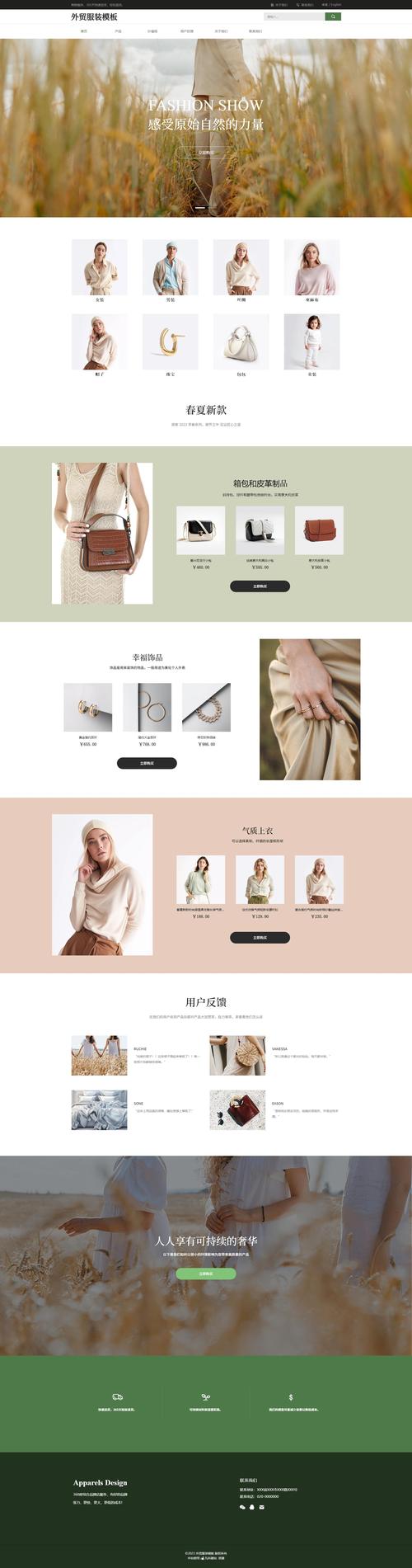
(图片来源网络,侵删)
<!DOCTYPE html>
<html lang="zh-CN">
<head>
<meta charset="UTF-8">
<meta name="viewport" content="width=device-width, initial-scale=1.0">风尚衣橱 - 您的时尚之选</title>
<style>
/* --- 全局样式 --- */
* {
margin: 0;
padding: 0;
box-sizing: border-box;
}
body {
font-family: -apple-system, BlinkMacSystemFont, "Segoe UI", Roboto, "Helvetica Neue", Arial, sans-serif;
line-height: 1.6;
color: #333;
background-color: #f8f9fa;
}
.container {
width: 90%;
max-width: 1200px;
margin: 0 auto;
padding: 0 15px;
}
h1, h2, h3 {
color: #2c3e50;
margin-bottom: 15px;
}
p {
color: #555;
margin-bottom: 15px;
}
a {
text-decoration: none;
color: #007bff;
}
/* --- 导航栏 --- */
header {
background-color: #fff;
box-shadow: 0 2px 5px rgba(0,0,0,0.1);
position: sticky;
top: 0;
z-index: 1000;
}
nav {
display: flex;
justify-content: space-between;
align-items: center;
padding: 15px 0;
}
.logo {
font-size: 24px;
font-weight: bold;
color: #2c3e50;
}
.nav-links {
display: flex;
list-style: none;
}
.nav-links li {
margin-left: 25px;
}
.nav-links a {
color: #333;
font-weight: 500;
transition: color 0.3s;
}
.nav-links a:hover {
color: #007bff;
}
/* --- 轮播图 --- */
.carousel-container {
position: relative;
width: 100%;
height: 500px;
overflow: hidden;
margin-bottom: 40px;
}
.carousel-slide {
display: none;
width: 100%;
height: 100%;
}
.carousel-slide.active {
display: block;
}
.carousel-slide img {
width: 100%;
height: 100%;
object-fit: cover;
}
.carousel-caption {
position: absolute;
bottom: 20px;
left: 50%;
transform: translateX(-50%);
color: white;
text-align: center;
background-color: rgba(0, 0, 0, 0.5);
padding: 15px 30px;
border-radius: 5px;
}
.carousel-prev, .carousel-next {
position: absolute;
top: 50%;
transform: translateY(-50%);
background-color: rgba(0, 0, 0, 0.5);
color: white;
border: none;
padding: 15px 20px;
cursor: pointer;
font-size: 18px;
transition: background-color 0.3s;
}
.carousel-prev { left: 20px; }
.carousel-next { right: 20px; }
.carousel-prev:hover, .carousel-next:hover {
background-color: rgba(0, 0, 0, 0.8);
}
/* --- 商品展示区 --- */
.products-section {
padding: 40px 0;
}
.section-title {
text-align: center;
margin-bottom: 40px;
font-size: 32px;
}
.product-grid {
display: grid;
grid-template-columns: repeat(auto-fit, minmax(250px, 1fr));
gap: 30px;
}
.product-card {
background-color: #fff;
border-radius: 8px;
overflow: hidden;
box-shadow: 0 4px 6px rgba(0,0,0,0.1);
transition: transform 0.3s, box-shadow 0.3s;
}
.product-card:hover {
transform: translateY(-10px);
box-shadow: 0 8px 15px rgba(0,0,0,0.2);
}
.product-card img {
width: 100%;
height: 300px;
object-fit: cover;
}
.product-info {
padding: 20px;
}
.product-info h3 {
font-size: 18px;
margin-bottom: 10px;
}
.product-info p {
font-size: 16px;
color: #e74c3c;
font-weight: bold;
}
/* --- 特色介绍 --- */
.features-section {
background-color: #fff;
padding: 60px 0;
margin-top: 40px;
}
.features-grid {
display: grid;
grid-template-columns: repeat(auto-fit, minmax(250px, 1fr));
gap: 40px;
text-align: center;
}
.feature-item i {
font-size: 48px;
color: #3498db;
margin-bottom: 20px;
}
/* 使用 Emoji 代替图标库,更简单 */
.feature-item .icon {
font-size: 48px;
color: #3498db;
margin-bottom: 20px;
}
/* --- 页脚 --- */
footer {
background-color: #2c3e50;
color: #ecf0f1;
text-align: center;
padding: 30px 0;
}
footer p {
margin-bottom: 0;
}
/* --- 响应式设计 --- */
@media (max-width: 768px) {
.nav-links {
display: none; /* 在移动端可以隐藏或做成汉堡菜单 */
}
.carousel-container {
height: 300px;
}
.section-title {
font-size: 24px;
}
}
</style>
</head>
<body>
<!-- 导航栏 -->
<header>
<div class="container">
<nav>
<a href="#" class="logo">风尚衣橱</a>
<ul class="nav-links">
<li><a href="#home">首页</a></li>
<li><a href="#products">新品上市</a></li>
<li><a href="#about">关于我们</a></li>
<li><a href="#contact">联系方式</a></li>
</ul>
</nav>
</div>
</header>
<main>
<!-- 轮播图 -->
<section id="home" class="carousel-container">
<div class="carousel-slide active">
<img src="https://images.unsplash.com/photo-1522383225653-ed111181a951?ixlib=rb-4.0.3&ixid=M3wxMjA3fDB8MHxwaG90by1wYWdlfHx8fGVufDB8fHx8fA%3D%3D&auto=format&fit=crop&w=1170&q=80" alt="春季新品">
<div class="carousel-caption">
<h2>春季新品系列</h2>
<p>探索清新的色彩与舒适的面料</p>
</div>
</div>
<div class="carousel-slide">
<img src="https://images.unsplash.com/photo-1441986300917-64674bd600d8?ixlib=rb-4.0.3&ixid=M3wxMjA3fDB8MHxwaG90by1wYWdlfHx8fGVufDB8fHx8fA%3D%3D&auto=format&fit=crop&w=1170&q=80" alt="时尚潮流">
<div class="carousel-caption">
<h2>引领潮流</h2>
<p>穿上我们的衣服,展现你的独特风格</p>
</div>
</div>
<div class="carousel-slide">
<img src="https://images.unsplash.com/photo-1578662996442-48f60103fc96?ixlib=rb-4.0.3&ixid=M3wxMjA3fDB8MHxwaG90by1wYWdlfHx8fGVufDB8fHx8fA%3D%3D&auto=format&fit=crop&w=1170&q=80" alt="限时优惠">
<div class="carousel-caption">
<h2>限时优惠</h2>
<p>全场商品低至5折,机会不容错过!</p>
</div>
</div>
<button class="carousel-prev">❮</button>
<button class="carousel-next">❯</button>
</section>
<div class="container">
<!-- 商品展示区 -->
<section id="products" class="products-section">
<h2 class="section-title">热门商品</h2>
<div class="product-grid">
<div class="product-card">
<img src="https://images.unsplash.com/photo-1521572163474-6864f9cf17ab?ixlib=rb-4.0.3&ixid=M3wxMjA3fDB8MHxwaG90by1wYWdlfHx8fGVufDB8fHx8fA%3D%3D&auto=format&fit=crop&w=1170&q=80" alt="白色T恤">
<div class="product-info">
<h3>纯棉白色T恤</h3>
<p>¥ 99.00</p>
</div>
</div>
<div class="product-card">
<img src="https://images.unsplash.com/photo-1565884253704-c2358e53ac88?ixlib=rb-4.0.3&ixid=M3wxMjA3fDB8MHxwaG90by1wYWdlfHx8fGVufDB8fHx8fA%3D%3D&auto=format&fit=crop&w=1170&q=80" alt="牛仔裤">
<div class="product-info">
<h3>修身牛仔裤</h3>
<p>¥ 299.00</p>
</div>
</div>
<div class="product-card">
<img src="https://images.unsplash.com/photo-1526506118085-60ce9d3dfd3f?ixlib=rb-4.0.3&ixid=M3wxMjA3fDB8MHxwaG90by1wYWdlfHx8fGVufDB8fHx8fA%3D%3D&auto=format&fit=crop&w=1170&q=80" alt="连衣裙">
<div class="product-info">
<h3>碎花连衣裙</h3>
<p>¥ 399.00</p>
</div>
</div>
<div class="product-card">
<img src="https://images.unsplash.com/photo-1521572163474-6864f9cf17ab?ixlib=rb-4.0.3&ixid=M3wxMjA3fDB8MHxwaG90by1wYWdlfHx8fGVufDB8fHx8fA%3D%3D&auto=format&fit=crop&w=1170&q=80" alt="休闲外套">
<div class="product-info">
<h3>时尚休闲外套</h3>
<p>¥ 459.00</p>
</div>
</div>
</div>
</section>
<!-- 特色介绍 -->
<section id="about" class="features-section">
<h2 class="section-title">我们的优势</h2>
<div class="features-grid">
<div class="feature-item">
<div class="icon">🚚</div>
<h3>免费配送</h3>
<p>全场订单满199元,即可享受免费快递服务。</p>
</div>
<div class="feature-item">
<div class="icon">🔄</div>
<h3>7天无理由退换</h3>
<p>收到商品后7天内,如有不满意,可申请退换货。</p>
</div>
<div class="feature-item">
<div class="icon">💯</div>
<h3>品质保证</h3>
<p>我们严格把控每一件商品的质量,为您提供最优质的购物体验。</p>
</div>
</div>
</section>
</div>
</main>
<!-- 页脚 -->
<footer id="contact">
<div class="container">
<p>© 2025 风尚衣橱. 保留所有权利. | 联系我们: contact@fengshang.com | 电话: 400-123-4567</p>
</div>
</footer>
<script>
// --- 轮播图脚本 ---
let currentSlide = 0;
const slides = document.querySelectorAll('.carousel-slide');
const totalSlides = slides.length;
const prevBtn = document.querySelector('.carousel-prev');
const nextBtn = document.querySelector('.carousel-next');
function showSlide(index) {
slides.forEach(slide => slide.classList.remove('active'));
slides[index].classList.add('active');
}
function nextSlide() {
currentSlide = (currentSlide + 1) % totalSlides;
showSlide(currentSlide);
}
function prevSlide() {
currentSlide = (currentSlide - 1 + totalSlides) % totalSlides;
showSlide(currentSlide);
}
// 绑定按钮事件
nextBtn.addEventListener('click', nextSlide);
prevBtn.addEventListener('click', prevSlide);
// 自动播放
setInterval(nextSlide, 5000); // 每5秒切换一次
</script>
</body>
</html>
如何使用和修改:
- 保存文件:将上述代码复制并粘贴到文本编辑器中,另存为
index.html。 - 打开网页:直接用 Chrome、Firefox 或 Edge 等现代浏览器打开这个
index.html文件,你就能看到网页效果。 - 修改图片:代码中的图片链接使用了
unsplash.com的随机图片,如果你想换成自己的图片,只需将<img src="...">中的src属性值替换为你自己的图片路径即可。 - 修改文字:所有显示的文字,如“风尚衣橱”、“春季新品系列”、“纯棉白色T恤”等,都可以直接在HTML代码中找到并修改。
- 添加商品:在“商品展示区”找到
<div class="product-grid">,复制一个<div class="product-card">整块,然后修改其中的图片、标题和价格,即可添加新商品。 - 调整样式:所有颜色、字体大小、间距等样式都在
<style>标签中,你可以根据需要修改这些CSS值来改变网页的外观。
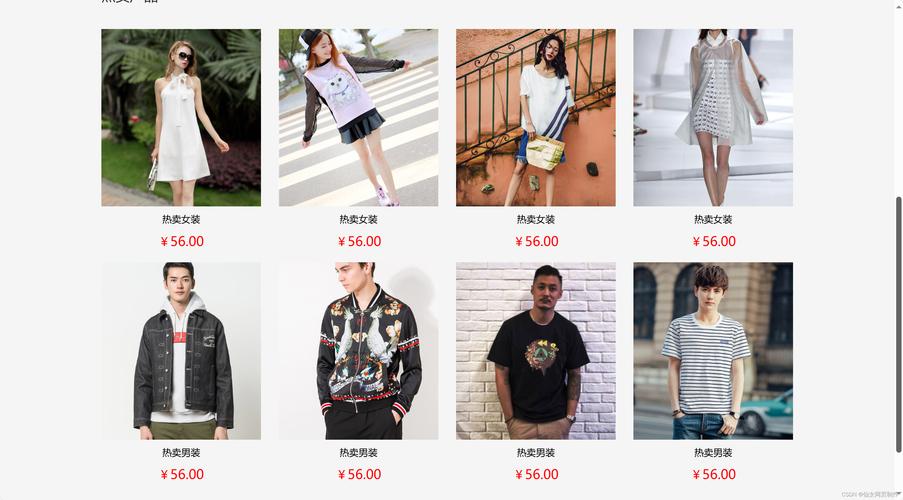
(图片来源网络,侵删)


