功能特点
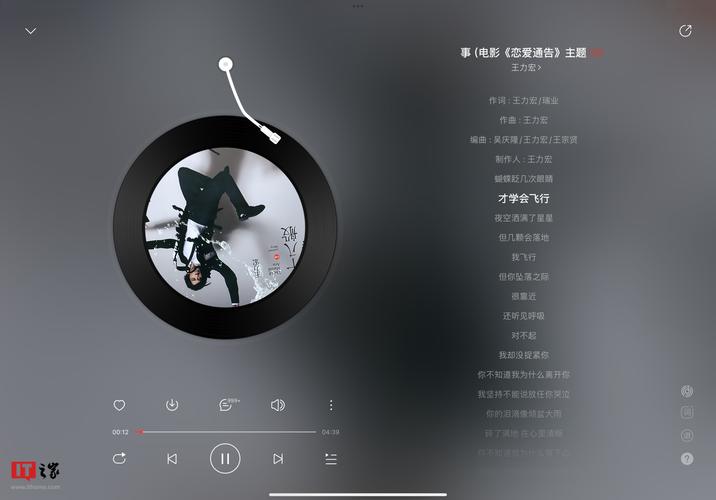
- 播放控制: 播放/暂停、上一首、下一首。
- 进度控制: 可拖动的进度条,显示当前播放时间和总时长。
- 音量控制: 可拖动的音量滑块。
- 播放列表: 可以添加多首歌曲,并支持切换。
- 响应式设计: 适配不同屏幕尺寸。
- 视觉反馈: 悬停效果、播放状态变化等。
最终效果预览
您可以将下面的代码复制到一个 .html 文件中,然后用浏览器打开即可看到效果。
(图片来源网络,侵删)
完整代码
<!DOCTYPE html>
<html lang="zh-CN">
<head>
    <meta charset="UTF-8">
    <meta name="viewport" content="width=device-width, initial-scale=1.0">现代音乐播放器</title>
    <style>
        /* --- 基础样式 --- */
        * {
            margin: 0;
            padding: 0;
            box-sizing: border-box;
        }
        body {
            font-family: 'Segoe UI', Tahoma, Geneva, Verdana, sans-serif;
            background: linear-gradient(135deg, #1e3c72, #2a5298);
            color: #fff;
            display: flex;
            justify-content: center;
            align-items: center;
            min-height: 100vh;
        }
        .player-container {
            background: rgba(255, 255, 255, 0.1);
            backdrop-filter: blur(10px);
            border-radius: 20px;
            padding: 30px;
            box-shadow: 0 8px 32px 0 rgba(31, 38, 135, 0.37);
            border: 1px solid rgba(255, 255, 255, 0.18);
            width: 90%;
            max-width: 400px;
        }
        /* --- 歌曲信息 --- */
        .song-info {
            text-align: center;
            margin-bottom: 20px;
        }
        .song-title {
            font-size: 1.5rem;
            font-weight: bold;
            margin-bottom: 5px;
        }
        .song-artist {
            font-size: 1rem;
            opacity: 0.8;
        }
        /* --- 专辑封面 --- */
        .album-cover {
            width: 200px;
            height: 200px;
            margin: 0 auto 20px;
            border-radius: 15px;
            overflow: hidden;
            box-shadow: 0 4px 15px rgba(0, 0, 0, 0.2);
        }
        .album-cover img {
            width: 100%;
            height: 100%;
            object-fit: cover;
        }
        /* --- 进度条 --- */
        .progress-container {
            background: rgba(255, 255, 255, 0.1);
            border-radius: 5px;
            height: 6px;
            margin-bottom: 10px;
            cursor: pointer;
        }
        .progress {
            background: #fff;
            height: 100%;
            width: 0%;
            border-radius: 5px;
            transition: width 0.1s linear;
        }
        .time-info {
            display: flex;
            justify-content: space-between;
            font-size: 0.8rem;
            opacity: 0.7;
            margin-bottom: 20px;
        }
        /* --- 控制按钮 --- */
        .controls {
            display: flex;
            justify-content: center;
            align-items: center;
            gap: 20px;
            margin-bottom: 20px;
        }
        .controls button {
            background: none;
            border: none;
            color: #fff;
            cursor: pointer;
            font-size: 1.2rem;
            transition: transform 0.2s;
        }
        .controls button:hover {
            transform: scale(1.1);
        }
        .play-pause-btn {
            font-size: 2rem;
            background: rgba(255, 255, 255, 0.2);
            width: 60px;
            height: 60px;
            border-radius: 50%;
            display: flex;
            justify-content: center;
            align-items: center;
        }
        /* --- 音量控制 --- */
        .volume-container {
            display: flex;
            align-items: center;
            gap: 10px;
            margin-bottom: 20px;
        }
        .volume-slider {
            flex-grow: 1;
            height: 5px;
            background: rgba(255, 255, 255, 0.1);
            border-radius: 5px;
            cursor: pointer;
            position: relative;
        }
        .volume-level {
            background: #fff;
            height: 100%;
            width: 70%;
            border-radius: 5px;
        }
        /* --- 播放列表 --- */
        .playlist-container {
            max-height: 150px;
            overflow-y: auto;
        }
        .playlist-title {
            font-size: 1.1rem;
            margin-bottom: 10px;
            text-align: center;
        }
        .playlist-item {
            padding: 10px;
            border-radius: 8px;
            cursor: pointer;
            transition: background 0.2s;
        }
        .playlist-item:hover {
            background: rgba(255, 255, 255, 0.1);
        }
        .playlist-item.active {
            background: rgba(255, 255, 255, 0.2);
            font-weight: bold;
        }
    </style>
</head>
<body>
    <div class="player-container">
        <!-- 歌曲信息 -->
        <div class="song-info">
            <h2 class="song-title">歌曲标题</h2>
            <p class="song-artist">艺术家</p>
        </div>
        <!-- 专辑封面 -->
        <div class="album-cover">
            <img id="album-cover-img" src="https://via.placeholder.com/200" alt="专辑封面">
        </div>
        <!-- 进度条 -->
        <div class="progress-container" id="progress-container">
            <div class="progress" id="progress"></div>
        </div>
        <div class="time-info">
            <span id="current-time">0:00</span>
            <span id="duration">0:00</span>
        </div>
        <!-- 控制按钮 -->
        <div class="controls">
            <button id="prev-btn"><i class="fas fa-step-backward"></i></button>
            <button id="play-pause-btn" class="play-pause-btn"><i class="fas fa-play"></i></button>
            <button id="next-btn"><i class="fas fa-step-forward"></i></button>
        </div>
        <!-- 音量控制 -->
        <div class="volume-container">
            <i class="fas fa-volume-down"></i>
            <div class="volume-slider" id="volume-slider">
                <div class="volume-level" id="volume-level"></div>
            </div>
            <i class="fas fa-volume-up"></i>
        </div>
        <!-- 播放列表 -->
        <div class="playlist-container">
            <h3 class="playlist-title">播放列表</h3>
            <div id="playlist">
                <!-- 播放列表项将通过 JavaScript 动态生成 -->
            </div>
        </div>
    </div>
    <!-- 引入 Font Awesome 图标库 -->
    <link rel="stylesheet" href="https://cdnjs.cloudflare.com/ajax/libs/font-awesome/6.0.0-beta3/css/all.min.css">
    <script>
        // --- 音乐播放器逻辑 ---
        // 获取DOM元素
        const audio = new Audio();
        const playPauseBtn = document.getElementById('play-pause-btn');
        const prevBtn = document.getElementById('prev-btn');
        const nextBtn = document.getElementById('next-btn');
        const progress = document.getElementById('progress');
        const progressContainer = document.getElementById('progress-container');
        const currentTimeEl = document.getElementById('current-time');
        const durationEl = document.getElementById('duration');
        const volumeSlider = document.getElementById('volume-slider');
        const volumeLevel = document.getElementById('volume-level');
        const songTitle = document.querySelector('.song-title');
        const songArtist = document.querySelector('.song-artist');
        const albumCoverImg = document.getElementById('album-cover-img');
        const playlistEl = document.getElementById('playlist');
        // 播放列表数据
        const playlist = [
            {
                title: "夏日微风",
                artist: "梦想乐队",
                src: "https://www.soundhelix.com/examples/mp3/SoundHelix-Song-1.mp3",
                cover: "https://via.placeholder.com/200/87CEEB/FFFFFF?text=夏日"
            },
            {
                title: "城市夜景",
                artist: "DJ Shadow",
                src: "https://www.soundhelix.com/examples/mp3/SoundHelix-Song-2.mp3",
                cover: "https://via.placeholder.com/200/2F4F4F/FFFFFF?text=城市"
            },
            {
                title: "雨后彩虹",
                artist: "自然之声",
                src: "https://www.soundhelix.com/examples/mp3/SoundHelix-Song-3.mp3",
                cover: "https://via.placeholder.com/200/FF6347/FFFFFF?text=彩虹"
            }
        ];
        let currentSongIndex = 0;
        // 初始化播放列表
        function initPlaylist() {
            playlist.forEach((song, index) => {
                const item = document.createElement('div');
                item.classList.add('playlist-item');
                if (index === currentSongIndex) {
                    item.classList.add('active');
                }
                item.innerHTML = `<strong>${song.title}</strong><br><small>${song.artist}</small>`;
                item.addEventListener('click', () => loadSong(index));
                playlistEl.appendChild(item);
            });
        }
        // 加载歌曲
        function loadSong(index) {
            currentSongIndex = index;
            const song = playlist[currentSongIndex];
            audio.src = song.src;
            songTitle.textContent = song.title;
            songArtist.textContent = song.artist;
            albumCoverImg.src = song.cover;
            // 更新播放列表高亮
            document.querySelectorAll('.playlist-item').forEach((item, i) => {
                if (i === index) {
                    item.classList.add('active');
                } else {
                    item.classList.remove('active');
                }
            });
            // 如果音频已经暂停,则播放新歌
            if (audio.paused) {
                audio.play();
                playPauseBtn.innerHTML = '<i class="fas fa-pause"></i>';
            }
        }
        // 播放/暂停
        function togglePlayPause() {
            if (audio.paused) {
                audio.play();
                playPauseBtn.innerHTML = '<i class="fas fa-pause"></i>';
            } else {
                audio.pause();
                playPauseBtn.innerHTML = '<i class="fas fa-play"></i>';
            }
        }
        // 上一首
        function prevSong() {
            currentSongIndex--;
            if (currentSongIndex < 0) {
                currentSongIndex = playlist.length - 1;
            }
            loadSong(currentSongIndex);
        }
        // 下一首
        function nextSong() {
            currentSongIndex++;
            if (currentSongIndex >= playlist.length) {
                currentSongIndex = 0;
            }
            loadSong(currentSongIndex);
        }
        // 更新进度条
        function updateProgress() {
            const { duration, currentTime } = audio;
            const progressPercent = (currentTime / duration) * 100;
            progress.style.width = `${progressPercent}%`;
            // 更新时间显示
            currentTimeEl.textContent = formatTime(currentTime);
            durationEl.textContent = formatTime(duration);
        }
        // 设置进度条
        function setProgress(e) {
            const width = this.clientWidth;
            const clickX = e.offsetX;
            const duration = audio.duration;
            audio.currentTime = (clickX / width) * duration;
        }
        // 格式化时间 (mm:ss)
        function formatTime(seconds) {
            if (isNaN(seconds)) return '0:00';
            const minutes = Math.floor(seconds / 60);
            const remainingSeconds = Math.floor(seconds % 60);
            return `${minutes}:${remainingSeconds < 10 ? '0' : ''}${remainingSeconds}`;
        }
        // 更新音量
        function changeVolume(e) {
            const width = this.clientWidth;
            const clickX = e.offsetX;
            const volume = clickX / width;
            audio.volume = volume;
            volumeLevel.style.width = `${volume * 100}%`;
        }
        // 事件监听器
        playPauseBtn.addEventListener('click', togglePlayPause);
        prevBtn.addEventListener('click', prevSong);
        nextBtn.addEventListener('click', nextSong);
        audio.addEventListener('timeupdate', updateProgress);
        audio.addEventListener('ended', nextSong); // 歌曲结束时自动播放下一首
        progressContainer.addEventListener('click', setProgress);
        volumeSlider.addEventListener('click', changeVolume);
        // 初始化
        initPlaylist();
        loadSong(currentSongIndex);
    </script>
</body>
</html>
代码结构解析
-
HTML (
<body>部分):- 定义了播放器的所有结构,包括歌曲信息、专辑封面、进度条、控制按钮、音量控制和播放列表。
- 使用了语义化的标签,如
<div>,<h2>,<p>,<img>等。 - 为了使用图标(如播放、暂停按钮),引入了 Font Awesome 库。
-
CSS (
<style>部分):- 整体布局: 使用
flexbox将播放器居中显示,背景采用了流行的渐变色和毛玻璃效果 (backdrop-filter: blur)。 - 组件样式: 为播放器的每个部分(如按钮、进度条、播放列表项)都设计了美观的样式,包括悬停效果和过渡动画,提升了用户体验。
- 响应式: 通过设置
max-width和相对单位,确保播放器在不同屏幕尺寸下都能良好显示。
- 整体布局: 使用
-
JavaScript (
<script>部分):- 核心对象: 创建了一个
new Audio()对象,这是所有音频操作的核心。 - 数据结构: 使用一个
playlist数组来存储歌曲信息(标题、艺术家、音频文件URL、封面图URL),方便管理和扩展。 - 功能函数:
loadSong(index): 根据索引加载歌曲,更新界面信息,并高亮当前播放的歌曲。togglePlayPause(): 切换播放和暂停状态,并更新按钮图标。prevSong()/nextSong(): 切换到上一首/下一首歌曲,并处理循环逻辑。updateProgress(): 在timeupdate事件中调用,更新进度条宽度和时间显示。setProgress(e): 允许用户通过点击进度条来跳转到指定位置。changeVolume(e): 允许用户通过点击音量条来调整音量。
- 事件监听: 将DOM元素与JavaScript函数连接起来,实现用户交互。
- 核心对象: 创建了一个
如何使用和自定义
-
替换音乐文件:
 (图片来源网络,侵删)
- 在
playlist数组中,找到src属性。 - 将
https://www.soundhelix.com/examples/mp3/...替换为你自己的音乐文件URL(可以是网络链接或本地文件路径,本地路径需要服务器环境才能正确播放)。
- 在
-
替换封面图片:
- 在
playlist数组中,找到cover属性。 - 将
https://via.placeholder.com/...替换为你自己的图片URL。
- 在
-
添加/删除歌曲:
- 直接在
playlist数组中添加或删除对象即可,播放器会自动适应新的列表。
- 直接在
-
修改样式:
- 在
<style>标签内修改CSS代码,可以轻松改变颜色、字体、布局等,打造属于你自己的独特播放器。
- 在


